Control grammar
Controls and indicators are defined using a strict but rich grammar. The form’s editor checks the formula as soon as you leave the field: it underlines the spot of each error, explains it in plain words and, if a coordinate is ambiguous, lists the candidate cells (see How to create a new control). In assisted mode, it suggests the templates, rows, columns and sheets of the DPM dictionary while you type.
Datapoint coordinate
Each cell of a regulatory template is written between curly braces:
{TEMPLATE, ROW, COLUMN, SHEET ?}, for example{C 01.00, r0010, c0010}
For example, {C 01.00, r0010, c0010} refers to the following cell:
- the template “COREP C 01.00”: Capital adequacy – Own funds definition;
- row
r0010; - column
c0010.
The sheet (s0001, …) can be omitted: most templates have no sheets.
Writing rules:
- The row, column and sheet start with a lowercase letter (
r,c,s), followed by digits. - For a template with open rows or multiple sheets,
r999(ors999) designates all reported rows (or all sheets). The control is then duplicated for each of them, and the results are grouped under the label[r999]. - The template code can be written
C 01.00,C_01.00or with a suffix such asC 73.00.aorF 18.00.a.
Defining simple formulas
Formulas are made of members. In the formula {C 01.00, r0010, c0010} == {C 01.00, r0010, c0030}:
- the left member is
{C 01.00, r0010, c0010}; - the right member is
{C 01.00, r0010, c0030}; - the operator is
==.
Comparison operators
| Operator | Meaning | Example |
|---|---|---|
== |
equality | [member] == [member] |
!= or <> |
difference | [member] <> [member] |
<, >, <=, >= |
inequality | [member] >= 0 |
in |
membership of a list | {C 17.01.a, r0940, c0040} in (empty, 0) |
not in |
non-membership of a list | {C 17.01.a, r0940, c0040} not in (empty, 0) |
Lists are written between parentheses ( … ) or square brackets [ … ]. They contain numbers, texts between single quotes ('Bond') or other lists.
Only == and != / <> take the threshold into account, and only for a control with the Threshold match type.
Simple and compound formulas
The platform supports simple and compound formulas:
- Simple formulas have the form
[member] operator [member]. - Compound formulas combine several formulas with the logical operators
&&(AND) and||(OR), and parentheses if needed:{C 01.00, r0010, c0010} > 0 && {C 01.00, r0020, c0010} > 0{C 01.00, r0010, c0010} > 0 || {C 01.00, r0020, c0010} > 0({C 01.00, r0010, c0010} > 0 && {C 01.00, r0020, c0010} > 0) || {C 01.00, r0030, c0010} == 0
The words AND and OR are not recognised as logical operators: use && and ||.
Writing members
Members can contain:
- coordinates, numbers (
0,0.05,-1), texts between single quotes, and the valuestrueandfalse; - the arithmetic operators
+,-,*,/, and the-sign in front of a coordinate.- Example:
{C 01.00, r0010, c0010} + {C 01.00, r0010, c0020}. - Amounts are computed in exact decimal:
0.1 + 0.2is exactly0.3, and3equals3.0. A division is rounded to 34 significant digits. - Caution: a division by zero prevents evaluation. The control gets the Unable to evaluate status, with the message “Division by zero: …”.
- Example:
- functions that take members as arguments:
function(member_1, …, member_n).
| Function | Purpose | Example |
|---|---|---|
abs(x) |
absolute value | abs({C 01.00, r0010, c0010}) |
min(x, y, …), max(x, y, …) |
minimum, maximum (see The min and max functions) | max({C 01.00, r0010, c0010}, 0) |
sum(x, y, …) |
sum | sum({C 01.00, r0020, c0010}, {C 01.00, r0030, c0010}) == {C 01.00, r0010, c0010} |
iif(condition, a, b) |
equals a if the condition is true, b otherwise |
iif({C 01.00, r0010, c0010} > 0, {C 01.00, r0020, c0010}, 0) >= 0 |
and(a, b), or(a, b) |
logical AND and OR in function form | and({C 01.00, r0010, c0010} > 0, {C 01.00, r0020, c0010} > 0) |
filed('TEMPLATE') |
true if the template, or one of its sub-templates, was reported in the reporting (see The filed function) | filed('C 03.00') && {C 03.00, r0010, c0010} > 0 |
empty(x) |
true if the value is missing | empty({C 73.00.a, r0140, c0050}) == true |
sumtop(x, n) |
sum of the n largest values of an open-row column |
sumtop({C 14.00, r999, c0060}, 5) |
sumif(cell, filter, criterion, …) |
sum of an open-row column, filtered on other columns of the same rows | sumif({C 01.00, r999, c0010}, {c0060}, 10) == 100 |
length(x) |
length of a text | length({C 06.02, r999, c0010}) > 0 |
memberPart(x) |
part of a member code located after “:”, for example FR for eba_GA:FR |
memberPart({…}) == 'FR' |
The iif function is the only form of condition: if(…) is not evaluated.
The min and max functions
min and max take as many arguments as needed. An empty argument is ignored, instead of counting as 0. A missing cell is only empty if its coordinate carries the (*) annotation: otherwise, it is replaced with 0 (see Replacing null datapoints).
min(5, {C 01.00, r0010, c0010}(*))equals 5 when the cell is missing;min(5, {C 01.00, r0010, c0010})equals 0 when the cell is missing, because it is replaced with 0;- the result is only empty if every argument is empty.
The filed function
filed('TEMPLATE') compares whole segments of the template code: runs of letters and runs of digits, whatever the separator (space, . or _). F41, F 41 and F_41 are therefore equivalent.
filed('J05.00')is true if J 05.00.b is reported: it is enough for one of the sub-templates to be reported.filed('F 1')is not true when only F 17 is reported, andfiled('F 17')does not match F 170.
The sumif function
sumif(column, filter_1, criterion_1, filter_2, criterion_2, …) adds up the values of column over the open rows that meet all the criteria. At least one filter and criterion pair is required. In a control, a coordinate reduced to a column ({c0060}) takes the template and row of the first argument.
A criterion can take the following forms:
| Criterion | Rows kept |
|---|---|
value or ['eq', value] |
the filtered value equals value |
['in', [v1, v2, …]] |
the filtered value is one of the values of the list |
['ne', value] |
the filtered value differs from value |
['gt', value], ['ge', value] |
the filtered value is greater than (gt), or greater than or equal to (ge), value |
['lt', value], ['le', value] |
the filtered value is less than (lt), or less than or equal to (le), value |
Rules:
gt,ge,ltandlecompare numbers. A row whose filtered value is a non-numeric text is not kept.- A row whose filtered value is missing is never kept, including with
ne. - Percentages are decimals: 10% is written
0.1. - When no row is kept,
sumifequals 0.
For example, sumif({C 28.00, r999, c0040}, {c0230}, ['ge', 0.1]) adds up the large exposures of at least 10% of Tier 1 capital.
Defining time-dependent formulas
It is sometimes necessary to compare the same coordinates at two different reporting dates. To do so, add the [T] annotation to your datapoints:
{C 01.00, r0010, c0010}[T] - {C 01.00, r0010, c0010}[T-1] > 0
Run in a given context, this formula checks that the value at T is greater than the value at T-1. A later period can also be targeted, for example [T+1].
Only the [T], [T+n] and [T-n] forms are accepted, where n is a whole number. Spaces are allowed, for example [ T-1 ]. The annotation also works for a cell holding a text, a date or a boolean: {…}[T] then returns that value.
The context is defined when the control plan is run:
- the reference date, which is the date of
T; - the period type, that is, the gap between two periods: “Month”, “Quarter”, “Semester” or “Year”.
For a [T-1] formula to be evaluated, the files of both dates must be selected at run time.
Replacing null datapoints
The datapoints of a reporting can be null or missing, when the institution does not have to fill them in. In that case, the formula evaluation can fail.
For example, take the formula {C 01.00, r0010, c0010} + {C 01.00, r0010, c0020} > 0 with:
{C 01.00, r0010, c0010} = null{C 01.00, r0010, c0020} = 1000
This formula is evaluated, because the engine automatically replaces null with 0. To prevent this replacement, add the (*) annotation to the coordinate:
{C 01.00, r0010, c0010}(*) + {C 01.00, r0010, c0020}(*) > 0
The formula then fails, which may be the expected result, because one of the coordinates is null. The annotation can be combined with the time annotation, and is placed after it: {C 01.00, r0010, c0010}[T-1](*).
With the annotation, a missing value is ignored by min and max (see The min and max functions).
Working with additional dimensions
Some templates contain datapoints that require additional dimensions. For example, the FINREP F 20.04 template is broken down by country: each country is reported in a dedicated template, with its own figures.
To specify an additional dimension, add it at the end of the datapoint, after a vertical bar:
{F 20.04, r0110, c0012 | RCP=eba_GA:FR}{F 20.04, r0110, c0012 | RCP=eba_GA:DK}
If several dimensions are needed, separate them with a semicolon:
{F 20.04, r0110, c0012 | XXX=eba_dim1:val1; YYY=eba_dim2:val2}
This kind of datapoint is used in a control or an indicator like any other.
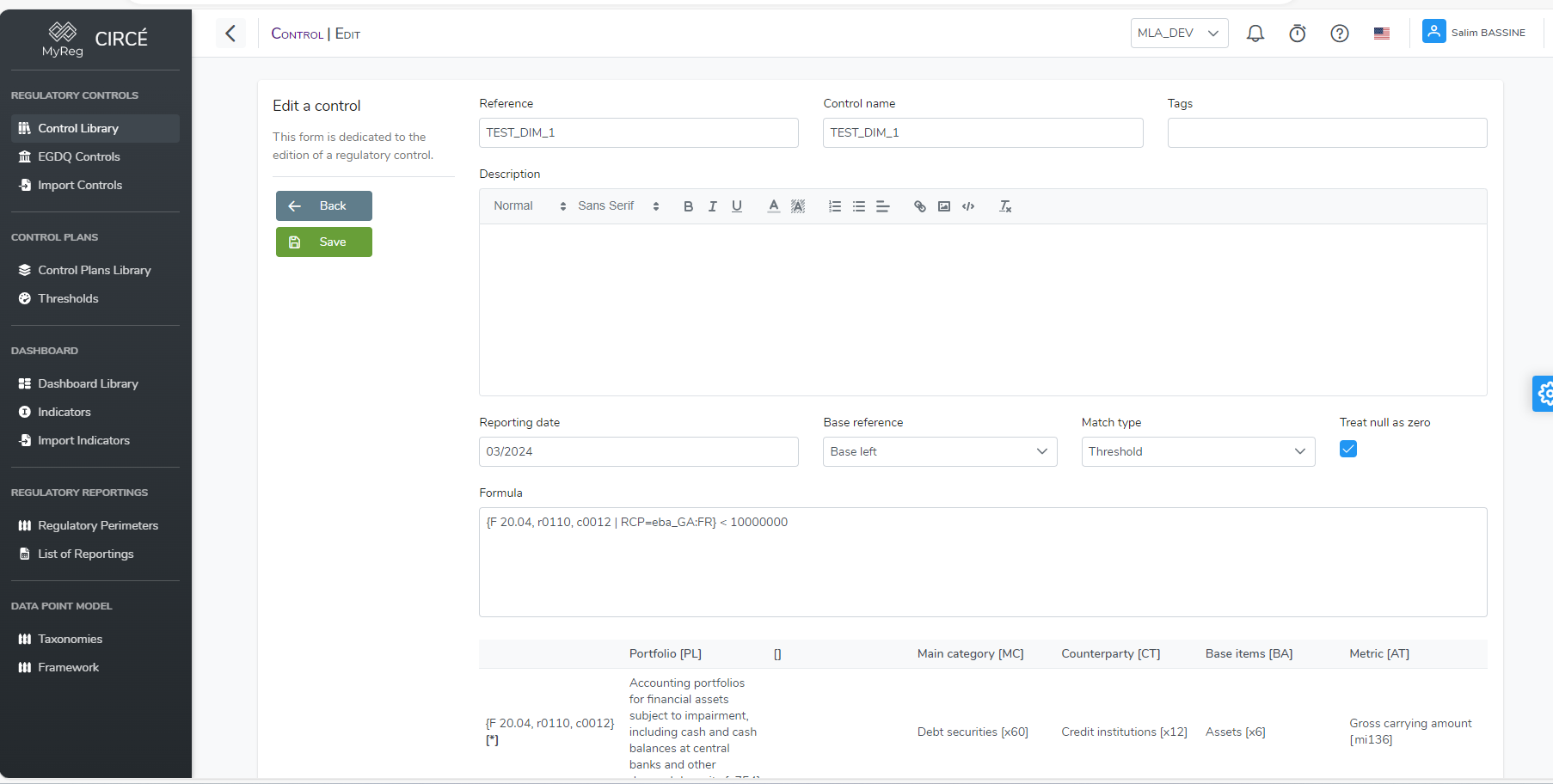
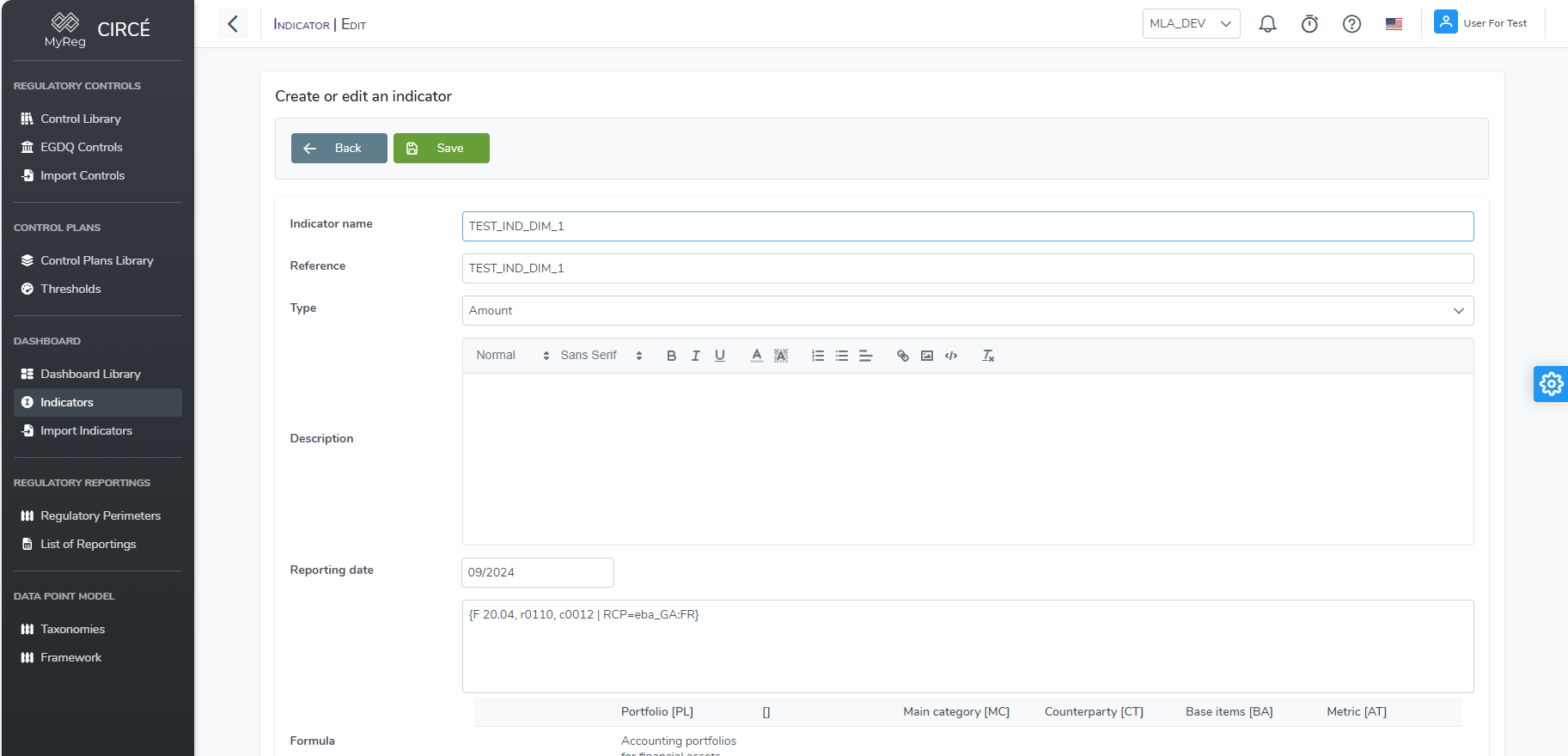
When the control plan or the dashboard is run, only the value matching the specified dimension is used and displayed.
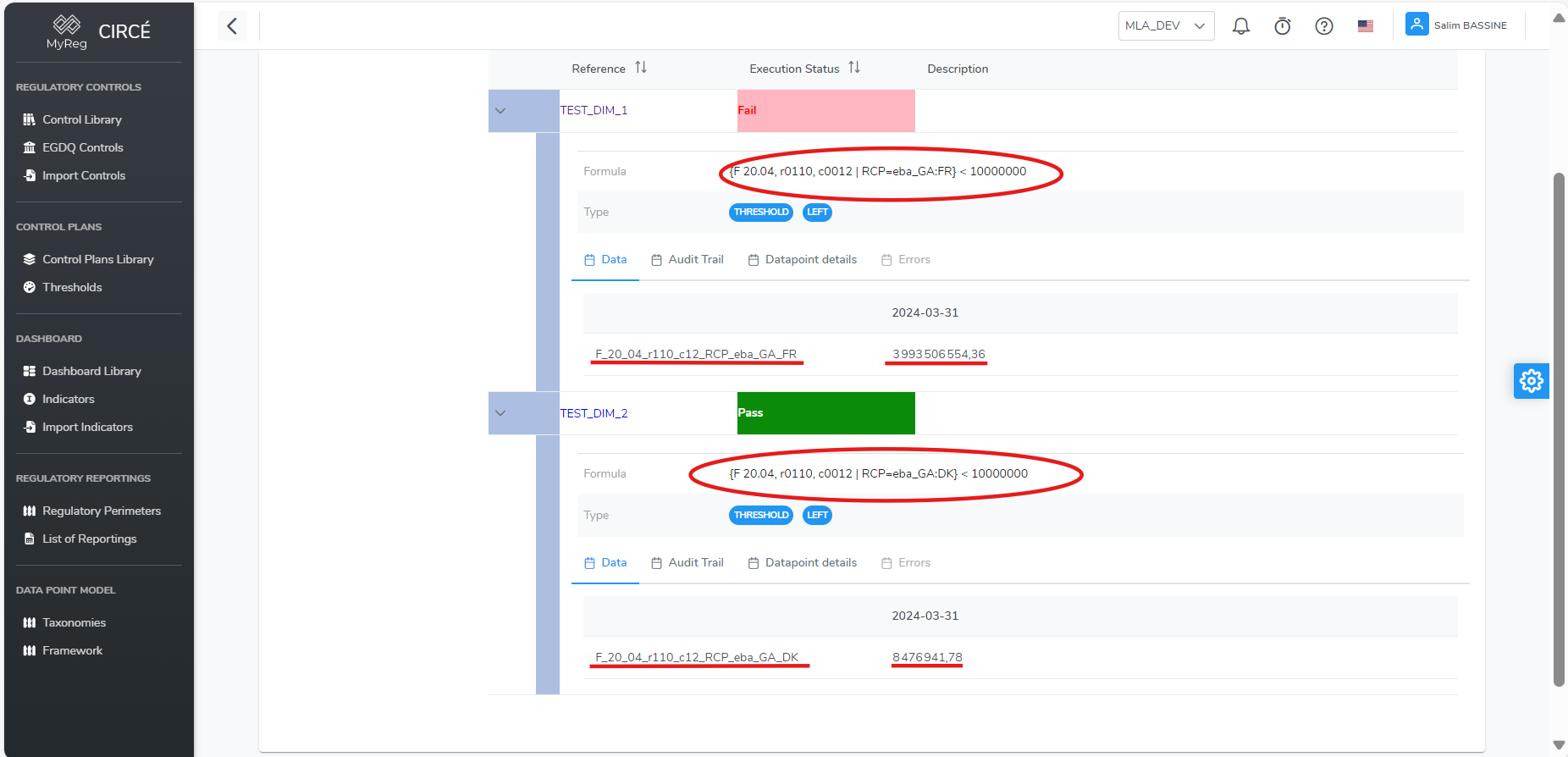
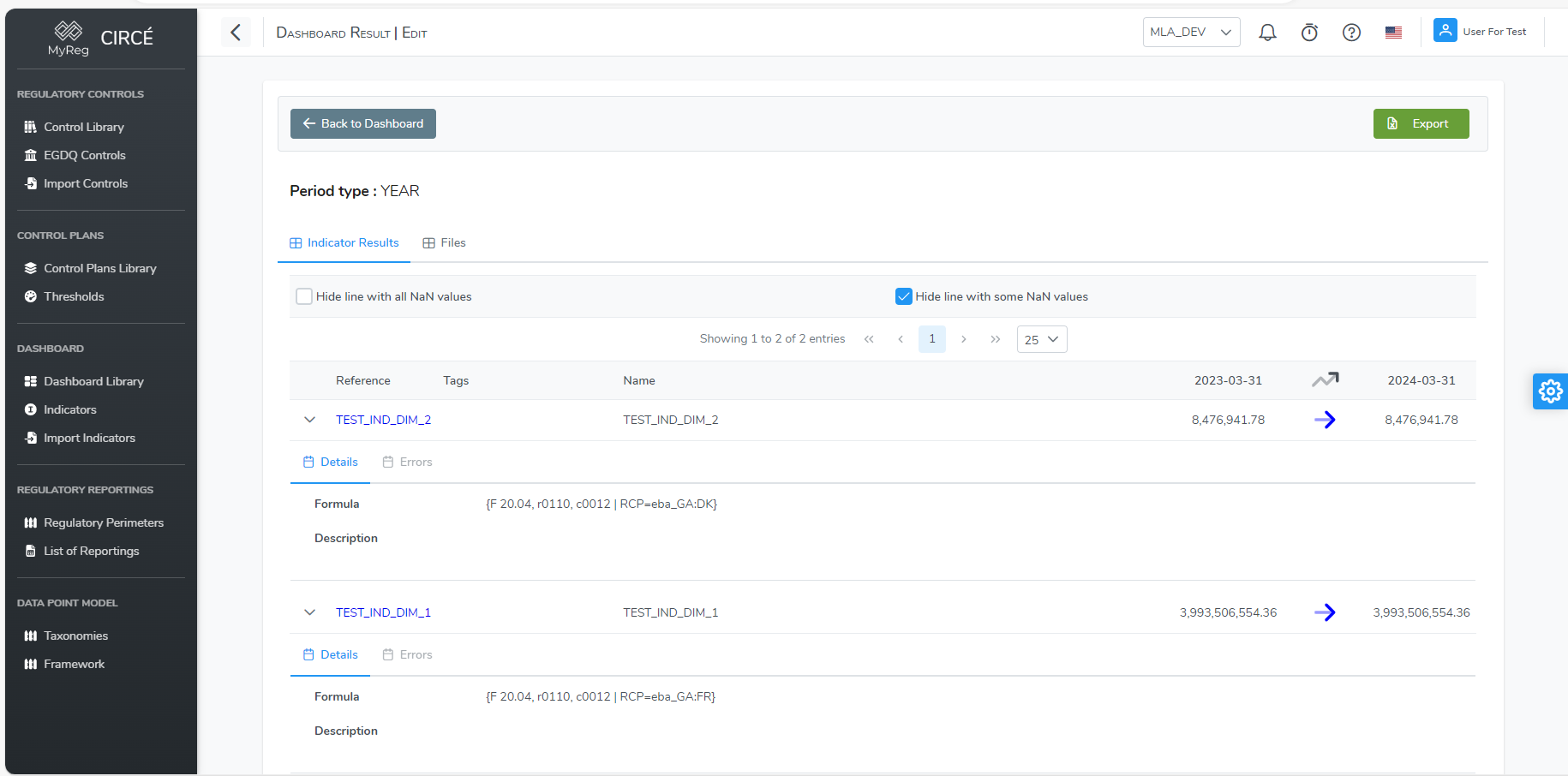
Indicator formulas
An indicator formula contains only one member, with no comparison operator. It uses the same coordinates, arithmetic operators and functions:
{C 01.00, r0010, c0010} / {C 02.00, r0010, c0010}
An indicator has a single value. An open-row coordinate (r999) is therefore only accepted as a direct argument of sum, sumtop, sumif or length, for example sumtop({C 28.00, r999, c0040}, 5). If the same coordinate is also read on its own elsewhere in the formula, the formula is not valid.
In an indicator, the sumif filter column is written in full: the short form {c0230} only works in controls. For example:
sumif({C 28.00, r999, c0040}, {C 28.00, r999, c0230}, ['ge', 0.1]) / {C 04.00, r0860, c0010}
Evaluation error messages
When a formula cannot be evaluated, the result gets the Unable to evaluate status. The message names the function or the value at fault, for example:
- “Division by zero: …”: a division by zero;
- “Cannot apply function … to …”: a function applied to a value it cannot handle;
- “Formula is not allowed: …”: a construct that is not part of the control grammar;
- “filter() function should have at least 1 filter”: a
sumifwith no filter and criterion pair.
Reading a DPM-XL rule (EGDQ-XL and VR-XL)
The controls of the EGDQ-XL and VR-XL libraries are written in the EBA’s DPM-XL language, as published by the ECB and the EBA. They are executed as they are. This language is not used to write your own controls, but it is useful to know how to read it.
Cell selection
{tF_01.01, r0010, c0010}designates a cell. Thetprefix introduces the table code, here F 01.01. An optional sheet goes last:, s0002.- A selection can cover several cells:
- a range:
c0010-0080; - all values of an axis:
r*,c*,s*; - a list:
(r0010, r0020).
- a range:
- Options go inside the curly braces:
default: 0gives the value used when a cell is missing;interval: trueorinterval: false.
with {tC_17.01.a, c0010-0080}: …sets a context. The references that follow then only state what is missing, for example{r0010}.{v_F_01.01}is true if table F 01.01 was reported in the reporting. It is the equivalent offiled(). The preconditions of EGDQ-XL and VR-XL rules are almost all of this form.
Operators and functions
| Category | Syntax |
|---|---|
| Arithmetic | +, -, *, / |
| Comparison | = (equality, with a single sign), !=, <, <=, >, >= |
| Logical | and, or, xor, not( … ) |
| Membership | in {0, 1} |
| Condition | if … then … else … endif (the else part is optional) |
| Numeric | abs, exp, ln, sqrt, power(a, b), log(a, b), max(a, b, …), min(a, b, …) |
| Missing values | isnull(x), nvl(x, default_value) |
| Text | match(x, 'regular expression'), len(x), concatenation & |
| Aggregates | sum, count, avg, median, max_aggr, min_aggr, optionally with group by |
| Literal values | numbers, percentages (10%), texts, true, false, null, dates (#2026-03-31#), member codes ([eba_GA:FR]) |
Examples:
{tF_18.00.a, r0010, c*} >= 0: all columns of row 0010 must be positive.with {tF_01.01, c0010}: if {r0010} > 0 then {r0020} = {r0030} endifwith {tF_01.01, default: 0}: {r0010, c0010} > {r0020, c0010}
A few language constructs are not yet evaluated by the platform: references to variables or operations, rename, properties and assignments. A rule that uses them gets the Unable to evaluate status, with the message “unsupported operand”.