CIRCÉ
User manual
Introduction
MyReg CIRCÉ (Inter Regulatory Reporting Controls, IRRC) is a regulatory platform designed to control regulatory reporting. It is based on the EBA DPM (Data Point Model) framework and on national taxonomies such as RUBA.
This manual describes CIRCÉ as of 10 November 2026. Recent changes are listed under What’s new.
The platform lets you:
- load your regulatory reports (XBRL, XBRL-CSV, ZIP archives) and organise them by perimeter;
- explore them template by template, compare them with each other and export their data;
- define your own controls and indicators, or use the libraries published by the ECB and the EBA:
- EGDQ-XL, the ECB data quality checks in DPM-XL format;
- VR-XL, the EBA validation rules in DPM-XL format;
- EGDQ and Validation Rules in the legacy layout, deprecated;
- EBA indicators;
- group controls into control plans and indicators into dashboards;
- run the plans and dashboards on your reports, then analyse and export the results;
- share work between teams through permissions.
Depending on the enabled modules, the platform also lets you:
- generate the Pillar 3 disclosures from your reports;
- load the EBA stress test workbooks and the ECB STE packages for SREP, then run the STE controls (see EBA stress test and STE for SREP);
- generate an XBRL-CSV package from a FINREP or COREP workbook, and compute FINREP from BIRD data;
- consult the public data of the ECB and the EBA;
- search a document library and ask the assistant.
Depending on your contract, some optional modules may or may not be enabled by your administrator:
- teams and permissions;
- AnaCredit;
- document library;
- assistant;
- Pillar 3;
- EBA stress test;
- STE for SREP;
- XBRL-CSV generation;
- FINREP from BIRD;
- public data.
The corresponding pages only appear if the module is active.
How this user manual is organised
This user manual is organised in seven sections:
- Getting started: logging in, navigation, home page, teams and permissions, settings and tasks.
- Core concepts: the objects handled by the platform.
- Control grammar: the formula syntax of controls and indicators, and how to read DPM-XL rules.
- The guides: three business walkthroughs, check a filing before submission, follow your ratios from one quarter to the next and produce the Pillar 3.
- The application’s screens, one page per menu entry.
- The glossary: the terms of the application and of this manual, each with a link to the section that describes it.
- What’s new: what changed in the application, month by month.
The application menu
The left-hand menu is organised in sections. After Home, it follows the usual work cycle:
| Section › group | Entries |
|---|---|
| Home | The home page |
| Controls & Indicators | Control library: a single page, whose nature selector gives Custom, Analytical Review, EGDQ, Validation Rules and AnaCredit* |
| Controls & Indicators › Indicators | Custom indicators, EBA indicators |
| Analysis › Reportings | EBA reportings, Pillar 3 workbooks, Stress test workbooks, Generate XBRL, FINREP from BIRD, STE for SREP, AnaCredit reportings |
| Analysis | Control plans, Dashboards, Dashboard templates |
| Resources | Regulatory library, Public data |
| Admin › Settings | Perimeters, Thresholds, Frameworks & Taxonomies, Import tasks* |
* only if the corresponding module is enabled. The Resources section only appears if one of its modules is enabled.
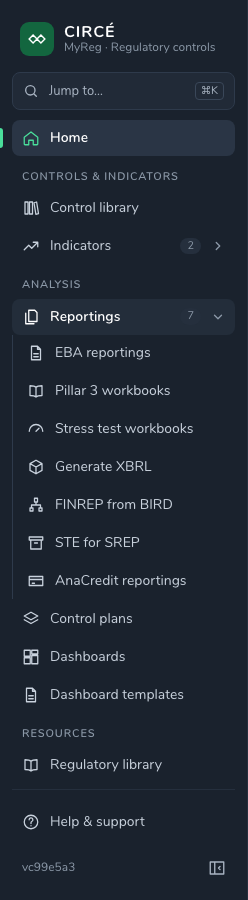
How to use the menu (collapsed menu, Jump to…) is described in Getting started.
A typical order of work is as follows:
- Create a perimeter and load your reports into it.
- Build your library of controls, or choose ECB and EBA controls.
- Group them into a control plan, then run it on your reports.
- Track your indicators over time with dashboards.