RUBA reportings
RUBA reportings are uploaded and browsed from Analysis › Reportings › EBA reportings, like DPM reportings (see Perimeters and reporting files).
RUBA is the national taxonomy of the ACPR and the Banque de France (tables RB.xx.xx). To upload a RUBA reporting, use the usual upload in XML format: a file name containing “ruba” automatically selects the RUBA format.
A RUBA file has its own details page, RUBA reporting. Its buttons are Back, Download, All Data and Filtered Data for the data point export, and Delete. The file name is edited there by clicking it.
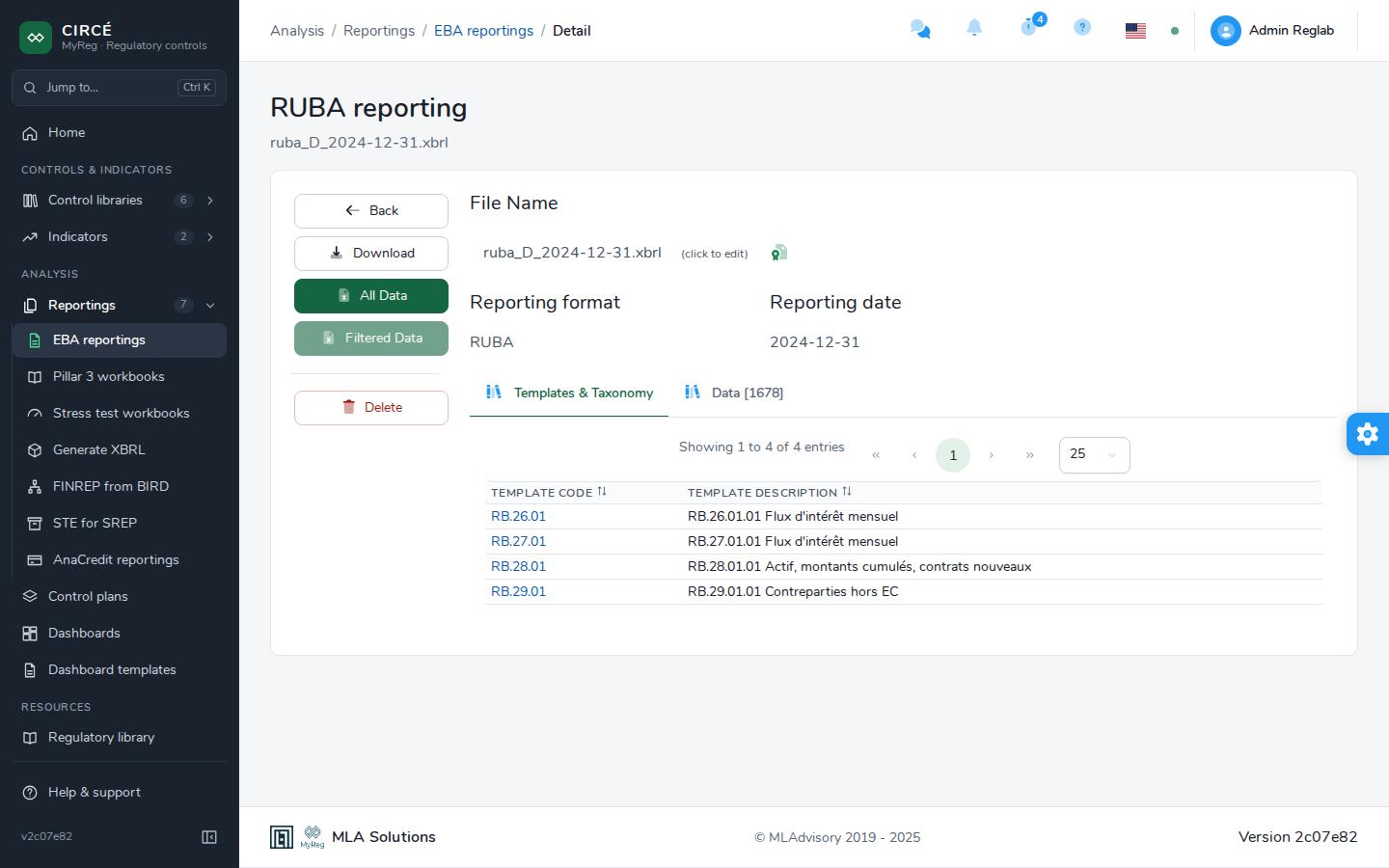
The page has the following tabs:
- Templates & Taxonomy: click a template’s code to display it as a table.
- The table has one tab per sheet and one selector per dimension.
- “More than One Data” flags a cell that receives several values.
- Data [n]: the context, metric, template, row, column and value, with filters.
- Unmatched Data, if the extraction is incomplete.
Comparing RUBA files works like comparing DPM files, with a few differences:
- In the Templates tab, clicking a template displays it with the values of all files side by side. Positive differences are in green, negative ones in red, and identical values in blue.
- The Side to side tab appears when several templates are common to all files. It displays these templates one by one.
- The Data Comparison tab has no per-column filters.
- The export always hides similar data and unmatched references.